
 FreeStudentProjects
 FreeStudentProjects
- Books management: this application can provide an automated method of managing the details of the books easily.
- Automation: This application can automate the way of managing the details of the books in an automated way.
- Category management: This application can provide an opportunity to the users to categorize the way of managing the application.
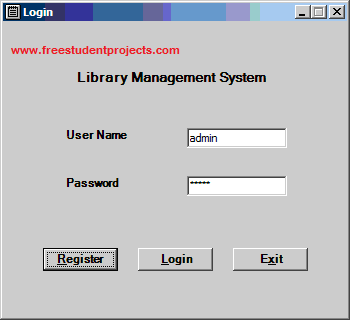 Manage Categories
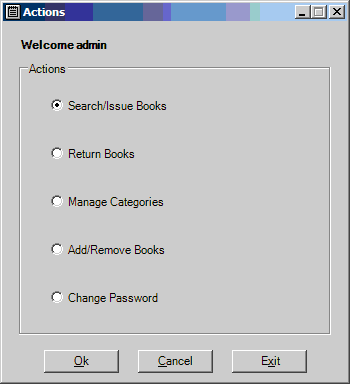 Search and Issue Books

 Return books
 Add category
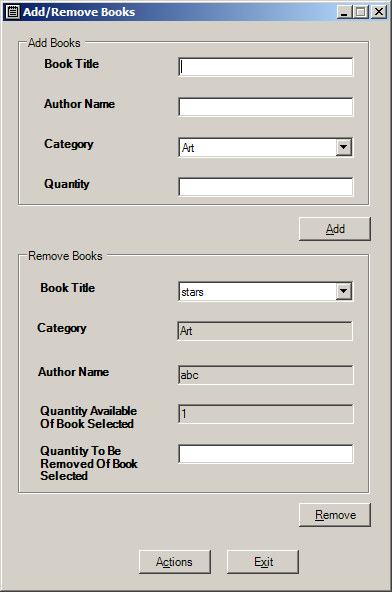
 Add Books or remove books
 Library management is easier through the use of this application. The new books that are introduced in the library are easily providable through this application. This application can also provide the location where the books are present. All the details of the books in the library are available. It can automate the work of librarians easily. The search for books is also available through this application. The application is reliable enough to depend on to get the details of the books in the library easily. There can also be a category that is available through this application. The details of the return of books and the fine that the issuers provide for the late return of books are also available. Automation of work is the main goal of using this application. It can automate the way of managing the work at the library.
DOWNLOAD NOW
Library management is easier through the use of this application. The new books that are introduced in the library are easily providable through this application. This application can also provide the location where the books are present. All the details of the books in the library are available. It can automate the work of librarians easily. The search for books is also available through this application. The application is reliable enough to depend on to get the details of the books in the library easily. There can also be a category that is available through this application. The details of the return of books and the fine that the issuers provide for the late return of books are also available. Automation of work is the main goal of using this application. It can automate the way of managing the work at the library.
DOWNLOAD NOW


The library.sql refers a stored procedure named sp_dboption but there is no code provided for such a database. To be precise, when I tru to run It in my SQL server 2012 management studio, I get the following errors:
Could not find stored procedure ‘sp_dboption’.
Msg 2812, Level 16, State 62, Line 2
Could not find stored procedure ‘sp_dboption’.
Msg 2812, Level 16, State 62, Line 2
Could not find stored procedure ‘sp_dboption’.
Msg 2812, Level 16, State 62, Line 2
Could not find stored procedure ‘sp_dboption’.
Msg 2812, Level 16, State 62, Line 2
Could not find stored procedure ‘sp_dboption’.
Msg 2812, Level 16, State 62, Line 2
Could not find stored procedure ‘sp_dboption’.
Msg 2812, Level 16, State 62, Line 2
Could not find stored procedure ‘sp_dboption’.
Msg 2812, Level 16, State 62, Line 2
Could not find stored procedure ‘sp_dboption’.
Msg 2812, Level 16, State 62, Line 2
Could not find stored procedure ‘sp_dboption’.
Msg 2812, Level 16, State 62, Line 2
Could not find stored procedure ‘sp_dboption’.
Msg 2812, Level 16, State 62, Line 2
Could not find stored procedure ‘sp_dboption’.
Msg 2812, Level 16, State 62, Line 2
Could not find stored procedure ‘sp_dboption’.
Msg 2812, Level 16, State 62, Line 2
Could not find stored procedure ‘sp_dboption’.
Msg 2812, Level 16, State 62, Line 2
Could not find stored procedure ‘sp_dboption’.
Msg 2812, Level 16, State 62, Line 2
Could not find stored procedure ‘sp_dboption’.
Msg 2812, Level 16, State 62, Line 2
Could not find stored procedure ‘sp_dboption’.
Msg 2812, Level 16, State 62, Line 2
Could not find stored procedure ‘sp_dboption’.
Msg 2812, Level 16, State 62, Line 2
Could not find stored procedure ‘sp_dboption’.
Msg 911, Level 16, State 1, Line 2
Please give the code for this stored procedure.
this program does not run at all
Kindly install necessary software.. We not providing softwares and all
i want to clear program………
The source code is clear and its a student project
Did you installed software properly.
the interface seems like nice but does not run properly
What error it shows?
I want to download project
yes.. definitely you can download this student project. Download link is there in the bottom of this page..
Click on download button
cannot open the project code in vs..any solution?
login failed for user ‘sa’ every time i try to run it.i and program terminates.
how to Run library.sql
Please properly installation guide from library management project
how can i download the code